UC San Diego Campus Notice
OFFICE OF THE INTERIM CHIEF INFORMATION SECURITY OFFICER,
UC SAN DIEGO
OFFICE OF THE CHIEF INFORMATION SECURITY OFFICER,
UC SAN DIEGO HEALTH
March 11, 2024
ALL ACADEMICS, STAFF, AND STUDENTS AT UC SAN DIEGO (Including UC San Diego Health)

Duo Upgrade and New Login Experience

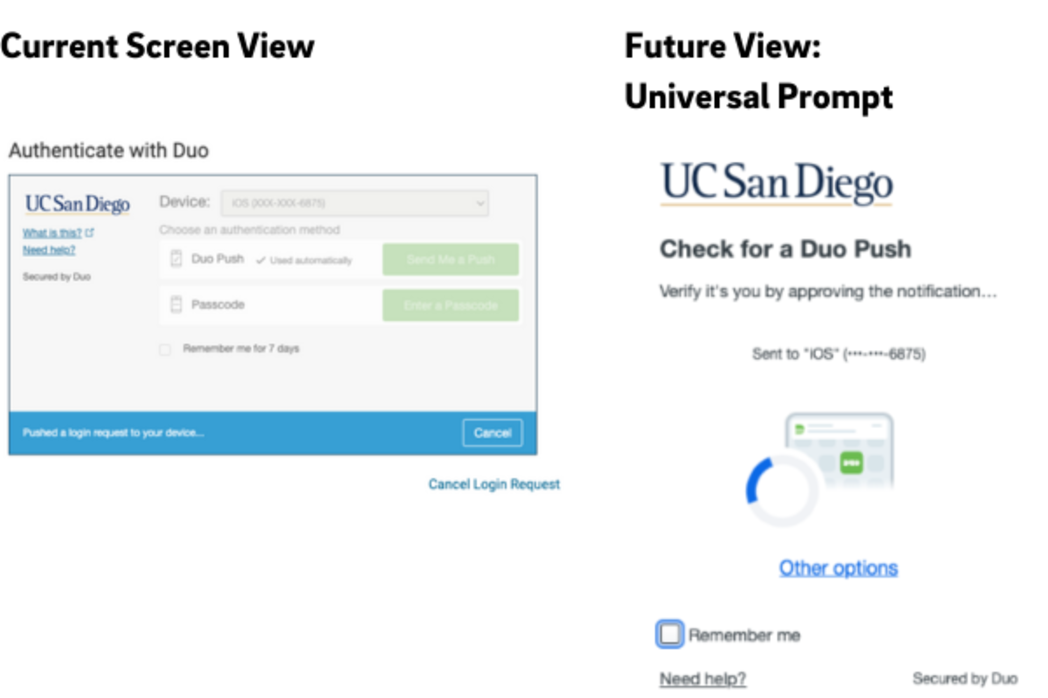
Effective March 26, 2024, UC San Diego and UC San Diego Health will jointly implement changes to Duo, which we use for our two-factor authentication services. We’ll be upgrading to Duo’s new Universal Prompt browser experience. As detailed below, this upgrade will
  • Change the visuals and process on your computer login screen
  • Not change how you use the Duo app or other authentication method
Universal Prompt Overview
Here are the basics of Universal Prompt: 
  • The first time you access a login platform following the upgrade, Duo will automatically select the most secure method to authenticate your identity (compared to the current experience of you choosing from a list). If Duo’s choice works for you, continue with authenticating. 
  • Alternatively, you may change the authentication method by clicking “Other Options.” You’ll see a list of other authentication methods you have registered.
  • Duo will remember your selection and automatically use it for future logins on the same platform and same browser.
Universal Prompt will automatically take effect once the upgrade work is complete, and you won’t need to do anything in advance to prepare.
The below image shows a side-by-side comparison of the current experience and the new one.

Side by side view of current login screen and future login screen with Duo Universal Prompt
Systems Affected
Duo Universal Prompt will apply to the following popular login platforms:
  • Campus single sign-on (SSO) applications such as Ecotime, Canvas, and more
  • Web-based applications like OneDrive, Sharepoint, O365 and campus webmail
  • Health applications including O365, Point & Click, and Duo SSO on March 26, 2024; Okta, Citrix, and other web-based applications to follow 
For campus applications, the “remember me for 7 days” option remains in effect. For Health, select applications will maintain the four-hour “remember me” option. 
You can learn more about Universal Prompt on the two-step login pages on Blink.
Questions and Help
If you need further help or have specific questions about this matter, please contact the relevant service desk. 
Campus:
  • Portal: https://support.ucsd.edu/its
  • Email: support@ucsd.edu
  • Phone: (858) 246-4357, M-F 7 a.m. - 10 p.m.; 12 - 3 p.m. weekends
Health
  • Portal: 3help.ucsd.edu
  • Email: 3help@health.ucsd.edu
  • Phone: (619) 543-4357 or Ext. 3-HELP
Kevin Chou
Interim Chief Information Security Officer, UC San Diego
Scott Currie
Chief Information Security Officer, UC San Diego Health
University of California San Diego, 9500 Gilman Drive, La Jolla, CA, 92093